Expression show-stopper… bummer

I’ve always been extremely interested in what goes on in the Web Design tools space.  I remember when Adobe came out with PageMill back in the mid-90’s, making great waves in that direction.  I then became a fan of FrontPage when they released their ’97 and ’98 versions.  However, FrontPage fell out of favor rather quickly when it became a crutch for people who had no business designing web sites, as well as generating it’s Extension-needed, non-standard, we’ll-wipe-out-your-code behavior.  I quickly switched over to Dreamweaver and didn’t look back… until a few months ago.

I became intrigued with the work Microsoft has been doing in the Expression Web space, and was delighted when they made it part of their MSDN Subscription tools.  It’s not that I’ve grown tired of Dreamweaver, but more of that “grass is greener” interest.  However, my interest abruptly halted when I realized that Expression – for all of it’s touting of standards and non-mucking of code (being the anti-Frontpage) –  still doesn’t support one of the most basic features: specifying a virtual path to root in links & references (like a stylesheet or menu).  Basically this removes any of the WYSIWYG and interactive functionality, which leads to the question: why would I want to be using this program again?

I can appreciate not trying to duplicate every competitor function, but when other market leaders like DreamWeaver & GoLive both support this function, how have you been ignoring this for so long?  This is the second-highest rated bug in their “Connect” feedback site, used to log bugs.  What’s disappointing is that MS came out with the beta of Expression 2, but that feature is still nowhere to be found.  Moreover, there’s an acknowledgement that it’s not really on their roadmap just being “considered” for a “future version”.

It’s unfortunate to see an application with so much potential be plagued by their inability to incorporate the most essential features to be competitive.  It’s too bad, designers may have liked this tool.

Vista Business SP1 = No pretty Alt+Tab?

I just upgraded my desktop here at work (which runs Vista Business) over to SP1, only to find that I no longer have the pretty Alt+Tab interface.  I loved that interface, where I pressed Alt+Tab to switch between programs, then while holding it down, was able to click on the program that I really wanted (I am notorious for having tons of windows open).

What the heck?  Was my Vista Business not supposed to have that in the first place?  Did it think my graphics card was good enough Pre-Sp1 and now it’s not?  I still have Aero Glass, so I don’t know what is going on with this.

Argh, that’s what I get for adopting things early – and in this case when it’s released to the public.

Update: A reboot seems to have refreshed my graphics driver.  It reset my resolution to very low, but after adjusting it I once again have my pretty Alt+Tabs.  Note that this reboot took place after it said the Installation as complete (and already rebooted my system).

Update2: This seems to be rooted within how windows switches back and forth between Remote Desktop and how Windows switches between Windows Basic and Areo.  It seems when I just do a disconnect from Remote Desktop, Vista stays in the Basic form until the next reboot (I haven’t tried the logout yet).  This is better than RD on my home computer, which simply goes to a blank screen that I need to lock my computer and then unlock to fix.  The Remote Desktop experience has been quirky to say the least.

Countdown drawing near: 2 days

It first became months, then became weeks, then days and now hours.  It is only hours until I am eligible for my "New Every Two" discount from Verizon. 

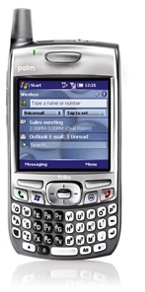
Treo700w

With that, I plan on finally relinquishing myself from my cursed Treo 700w.  I have been waiting for this day for so long.  It’s not that I’m happy to end my association with the Treo as much as I have grown to hate the phone with every bone in my body.

My association with the Treo started with the 650, with the Palm/Garnet OS.  The phone worked pretty well for the most part, but was still pretty quirky. Shortly thereafter I "upgraded" to the Treo 700w.  I put quotes around that word because while I love the high-speed EV-DO access that’s pretty much all I loved with that phone.  The call quality is miserable (and that was just the beginning).  The phone had an extremely low amount of memory, so much that running applications in parallel caused the phone to start screwing up.  I became extremely familiar with the Task Manager, shutting down virtually every application after I used it.  I had to deal with the shoddy Bluetooth ability (until an update helped that), as well as troubles pairing the device with my computer.  Any of my friends can tell you how much I’ve been frustrated with this phone, and how eager I am to be rid of it.  Besides the EV-DO the only other benefit about this phone is that it’s pretty durable, I’ve thrown in frustration so many times and it still manages to stay in one piece.

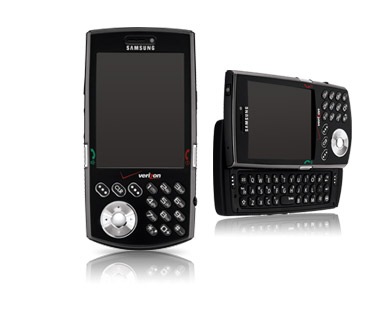
I’ve narrowed down my replacement to two different choices: the Samsung SCH-i760 and the (UTStarcom) XV6800. Both devices look great.  They’re both running Windows Mobile 6 – which isn’t the best mobile OS, but after transitioning from Palm to Windows Mobile, it’s too much effort to make another switch.  They both have EV-DO, along with the Wi-Fi option.  Both of them have a fold-out keyboard.  The XV6800 looks like an amazing, sleek device, but I am pretty concerned about the comments made about the call quality.  After my Treo experience I am extremely sensitive to having less-than-stellar call quality.  With that in mind, I’m leaning more towards the Samsung.  We’ll see how things go on Wednesday:

SamSung-SCHi760

Updated setup software list

I had meant to post this sooner, but I recently got a new desktop machine at work.  I didn’t have the login for the new machine, so I took it as an opportunity to wipe the hard drive and start off fresh. I wanted to talk a bit about my setup experience and about the software I put on the new machine.

First off I put Windows Vista Business on the machine.  I was lucky enough to get 3GB of RAM and since I’ve had a decent experience with my home desktop, I’ve decided to stick with Vista for now.

It should be noted that I am a MSDN member, which enables to me to install the Microsoft Suite of Applications & Developer tools:

  • Office 2007 (including OneNote, Project &Visio)
  • Expression Web (for Web Design & Dev)
  • Visual Studio 2008

These tools are wonderful, but I realize they may not be available to everyone.  If you’re a college student (or have a college email address) you can get office for really cheap at TheUltimateSteal.com – a Microsoft purchase program for students.  Also student developers can qualify to get Expression & Visual Studio for free at Microsoft DreamSpark.  This is a great strategy to get students acclimated to the MS applications, which means that it’ll transfer to employees demanding the tools when they enter the workplace.

The next thing I did was go to my favorite software site – FileHippo.  FileHippo is a repository for freeware – a one-stop-shop for downloads.  From here I grab the following (in no particular order):

Internet:

Apps & Utilities:

  • MS Office 2007
  • FoxIt Reader a PDF alternative to the bloated Adobe Reader
  • PDF Creator – Free PDF creating, although I am starting to try out Primo PDF
  • UltraVNC – The viewer on my work desktop, VNC installed on my home desktop
  • Burnaware – CD/DVD Burning
  • Launchy – Perfect application launcher for keyboard junkies
  • ObjectDock – “Sidebar” application launching
  • Windows Live Writer – What I use for blogging
  • MRemote – To manage multiple MS Remote Desktops/Terminal Servies, I haven’t had great results with VNC though

Scripting:

  • NotePad++ – Best general purpose editor hands-down

Photos & Multimedia:

  • MediaMonkey – Incredible media manager, especially if you have a large library (I paid for this one, but there is a free version).
  • Last.fm – Scrobble and track what I listen to (my profile)
  • VLC Media Player – For videos, DVD’s and single-file playing
  • Windows Live Photo Gallery – Easy way to manage, edit, tag and share photos (there is Flickr integration as well)
  • FastStone Image Viewer – On-the-fly image preview & browsing
  • Paint.NET – More in-depth photo editing

System Utilities:

  • Defraggler – Disk Defragmenting
  • AutoRuns – eliminate annoying startup programs
  • CCleaner – Get rid of crap, cookies and temp files
  • Unlocker – Gets you out of those “access denied” binds during deletions
  • Process Explorer – Task manager on steroids
  • Java Runtime Environment
  • Tugzip – Great alternative to Winzip, not quite WinRar, but free and open-source
  • Synctoy – to synchronize files between my work desktop and laptop, works great if you’re on the same network

Security:

  • Windows Vista Firewall works pretty well, but at home I use Comodo
  • AVG Anti-Virus (for the home computer, we use a separate solution at work)

Are there any essential tools that I’m missing?

Good customer service, or invading privacy?

The strangest series of events happened this afternoon. I received an unsolicited call on my cell phone from someone in Comcast sales late in the afternoon, mentioning that they had received an email query regarding comparisons of services.  I told them I made no such email and was confused as to why I would get a call.  I’ve done some web comparisons but at no time did I fill out any kind of contact form for any of the cable/satellite providers.

I did some investigating and hypothesized that I was called regarding my blog entry earlier in the day,  about my searching for TV/Internet options for the new house.

Why I believe this:

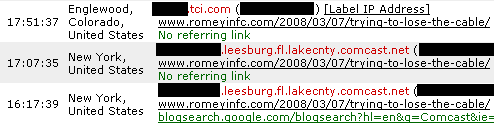
  1. Like many self-indulgent bloggers, I keep stats of who accesses my Ramblings.  Looking at the logs, I found the following subsequent entries (all are from today, times are listed in Eastern):
    WebStats

    As you can see someone in Comcast New York found my entry by doing a Google Blog search for “Comcast”.  I can tell you that the host name did not have one of the customer c-your-ip-address entries, which leads me to believe this is from an office. 

  2. The same IP address visits the site again 50 minutes later, this time with no referring link (which means they clicked on a link from either an email, bookmark, IM or external source). 
  3. 45 minutes later someone from TCI visits that same entry with no referencing link – and for those who remember their Colorado cable history TCI was purchased by AT&T in 1999, which was then sold to Comcast in 2001.
  4. Subsequently I get a call 10 minutes later on my cell phone – which isn’t listed anywhere – from the Comcast Sales Rep
  5. My last name is listed on my blog, along with my abbreviated first name – Jeromey “Romey”
  6. While my cell phone is unlisted, it is the billing phone number for my Comcast account.

There are other possibilities: One may be that I inadvertently provided my contact information in some kind of query form – which because I have no knowledge it means I have bigger problems.  The other option is that they got my name from the mortgage company – but Bethany’s name is on the mortgage app too, she has an account and she wasn’t called.

I think it’s a plausible assertion that someone at Comcast read my blog, connected the dots with my account, looked up my number and called me.  Now the question posed: is this good customer service or is this inappropriate usage of my billing information?

On one hand it’s really good customer service.  Do a Google Blog search for “Comcast” and you’ll find that there are literally hundreds of blog posts each day.  For them to proactively patrol the blogs for questioning or unhappy customers, then contact them to see if they can resolve their situation is a smart approach to put out a brushfire before it burns down the field.

On the other hand, it’s downright creepy.  While I sometimes forget that the whole point of blogging is to share your thoughts with the Internet community, I still can’t help but be shocked when such a direct response is taken to something I wrote.  Aside from questioning their alleged throttling activities and calling their DVR “crappy” I didn’t make inflammatory comments in my blog, and yet it bothered someone enough to call me up and make a sales call.  I provided my contact information to Comcast to discuss billing and service issues, and while I don’t think they violated their privacy policy, one may question the appropriateness of looking up that information based on something I wrote and empower a salesperson to make an unsolicited sales call. 

I’m not really sure where I stand, but I do have to be honest and say I was unnerved by the cold-call.  It’s not that I don’t want a response from people reading my blog, it’s just that one should use the same medium – the comments system – to respond. (Note to self: put email address back on template).  To reference the information I provided to a company for a different purpose probably isn’t appropriate.

The Comcast rep is supposed to call me back, but I’m not really sure what they can say that will persuade me. Unless the promotional price won’t expire (which is unheard of), they finally port the Tivo interface to their DVR’s (something they announced 15 months ago) and stop forcing me to pay $5 just to get the NFL Network, I’m going to Satellite for my TV.