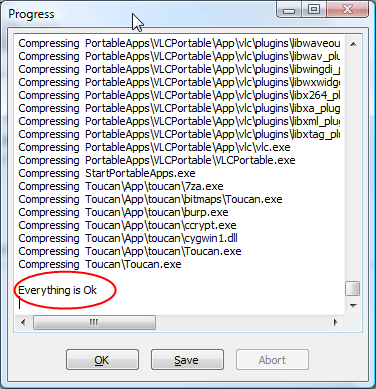
I ran a backup of my FlashDrive using Toucan this afternoon, and I love the message it gives in the status window after the backup is completed, something that’s perfect for a stress-filled end of the week:
Random musings of Jeromey Balderrama
I ran a backup of my FlashDrive using Toucan this afternoon, and I love the message it gives in the status window after the backup is completed, something that’s perfect for a stress-filled end of the week:
The countdown is on until closing on the house (39 days!) and all of those pre-move activities need to get in gear. One of those things is figuring out how our information utilities – TV & Internet. Currently I’m paying a hefty $150 check to Comcast each month for both digital cable and Internet. If you were to itemize my bill you would see:
One of the advantages of moving is to reassess whether you’re using all of those services and better define your needs. Things have changed since I originally subscribed to this package and I’m realizing I don’t need the bazillion channels that I’m not watching. I also no longer need HBO as Inside the NFL has been canceled from the network. A good HD package is important to me, and I want a DVR that actually works rather than the piece-of-crap that Comcast gives us. I also want the NFL Network, and do resent paying an extra $5 a month to Comcast just to get it. The music videos are nice, but not really necessary. With that in mind, I’m evaluating my satellite options:
DirectTV: $55.96 (for 12 months, rates hike back up to $73.96). Setup Costs: None, but $99 DVR purchase fee. Pros: You get Sci-Fi in HD (good for BSG) and they have a good offering of HD channels (includes NFL Network on standard HD tier). They also have the NFL Sunday Ticket package available, something I may be interested in having in the fall. Cons: Their DVR is rated as moderate, price hikes $20 after 1 year.
Dish Network: $52.99 (no indication of price hike) Setup Costs: $50 (opted out of 2 year agreement), doesn’t indicate about DVR costs. The HD channels are good, not as many as DirectTV but it does have the NFL Network. Pros: Cheapest solution and offers the best value of HD that I watch. The DVR is the highest rated on CNet. Cons: Not sure about DVR charges, no NFL Sunday Ticket option.
Comcast: $102 but if I remove HBO it’ll drop $11. Setup Costs: Unknown since it would transfer. Decent selection of HD channels. Pros: It’s what we know and most convenient to move. Cons: Crappy DVR, still need to pay $5/month for NFL Network, no Sunday Ticket option.
Dish Network looks like the best option to go with for now, but now comes the Internet wrinkle: I want high speed Internet, and Comcast offers the fastest download speeds. I like to game from my Xbox Live, so a consistent speed is needed as well. However, I’m pissed about their throttling and wouldn’t mind canceling the service. DSL isn’t an attractive option because of the slower download speed and the fact that I we may need a phone line (don’t know about naked DSL in Fort Collins). There are some WiFi providers in Northern Colorado, but I’m concerned that my HOA will prevent me from putting an antenna on the roof.
The ideal situation: I would like to go Dish + Comcast High Speed. My friend Kyle told me that he had it done before and a splitter can be installed, however this result in momentary connection loss, which can be very bad for gaming. The other thing I’m not sure about is that there are currently only 2 cable drops in the house (Living + Master Bedroom) so it may be difficult to split those cables as well. I could always run another cable to the office area, but I realize what a pain it is to run cables through finished walls.
If anyone has any ideas about the Internet solution (either naked DSL or some Comcast tips), I would greatly appreciate any input.
Update: After further research Qwest advertises up to 7mbps and offers naked DSL for $45 a month – comparable to what Comcast is doing. I’ll have to research this.
While traveling to LA on Thursday, we took a connecting Delta flight from Salt Lake City over to LAX. On the plane there were these screens in the back of the seats. A veteran of Frontier and the DirectTV system they have on the plane, this was nothing new. However the screens activated and I saw something I found hilarious. This may be something that many may have seen, but this was definitely new to me. I took a picture with my Treo, forgive the mirrored reflection of me and my hand:

If you can’t make it out, it’s booting to Linux, which for some reason I find humorous.
After the system finally booted up it revealed not only a Dish Network TV interface, but also some other interactive options including steaming music and in-flight multi-player gaming. This was a potentially pretty cool system – potentially because this was dog slow and buggy like none other. The touch-screen interface was quite delayed and when I changed between menus it reverted to some static, watered-down display. It was almost like it was having video card troubles. After we tried to access a menu option it took a few minutes to launch whatever content we selected.
Bethany and I ended up playing in-flight poker with another passenger, except he was sitting right next to us. When you have three people playing Texas Hold-Em sitting next to each other, it takes the suspense out of the game. Nonetheless it occupied us for almost an hour and definitely made the flight seem shorter.
The system was definitely buggy, but there was definitely a lot of potential there. If they can iron out the interface and response issues (besides the fact that it rebooted 5 times during the flight) this could be something pretty cool for passengers.
Things have unfortunately been far too crazy here at LA Congress to permit me to do any kind of blogging, but I intend to offer reflections when I get home Sunday. In the meantime I wanted to offer this gem:
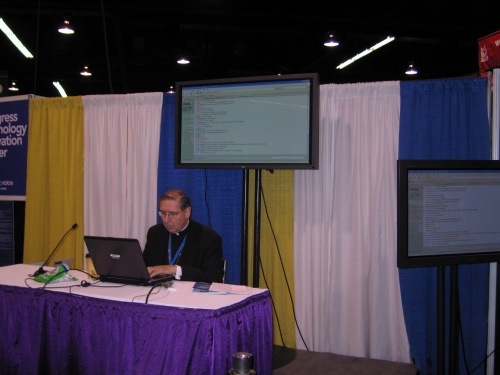
I took this picture of LA Cardinal Roger Mahony taking part in an a live chat, in which he was using Firefox. My picture isn’t the best quality, but loyal Firefox users can make this out:

Do you need any more reason to stick with IE? Even Cardinals are using Firefox.
Finally some good news from the Yahoo Mail Updates blog regarding the earlier Yahoo SMTP Issues:
Recently we began experiencing an unexpected increase in traffic through the servers we have dedicated for POP/SMTP messages. When we first became aware that some users were having their messages delayed because of this we examined the issue, and the initial solution appeared to have the problem under control. However we soon learned that more needed to be done to ensure the levels of service we strive to provide.
As a result we spent the last several days not only upgrading hardware resources for our SMTP servers, but also restructuring the way the bandwidth of these servers is allocated. We are confident that this solution will not only resolve the immediate problems, but also ensure that the systems are even more reliable in the future.
This is definitely welcome news after about 10 days of significant mail delays. There is a minor fix on the client side: you need to visit the Yahoo Mail site and check out the POP/SMTP configuration options to see if new servers are specified. I had to change my settings, but once I did that emails sent instantly.
One point of feedback I would offer about this situation is that Yahoo should have offered better communication throughout the process. I realize that it’s not in-style for these larger companies to offer “system status” pages, but this would have alleviated the entire situation. I appreciate the level of detail they offered in the “resolution” blog post, but this would have been great while this was going on. Instead a lot of us were left to stew in our frustration and anger, demonstrated in the comments of my original posting. This only further soured the already bitter taste in our mouths.