Did Digg change their RSS feeds?

This is a random technology gripe, but I wanted to throw it out there in case anyone else was experiencing this.

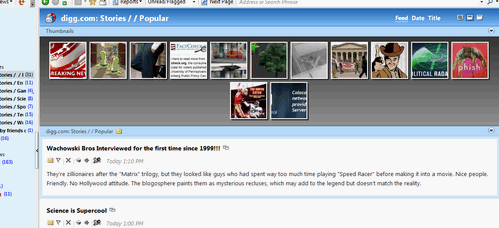
Did Digg change the way they’re presenting their RSS feeds?  I subscribe to all of the RSS feeds and keep up to date through FeedDemon (an awesome desktop RSS reader by the way).  All of the sudden on Thursday the feeds changed names (in a minor way) to “Digg Stories / / ..” and now are including associated images, which FeedDemon is displaying as thumbnails.

Personally I can’t stand the thumbnails view, and with a user-generated site like Digg there’s no telling what thumbnails will come up – especially if I’m viewing this in a public place.  Is there any way to turn the thumbnails off all-together, or subscribe to a Digg feed that doesn’t include these?  I looked on Digg and couldn’t find such a thing, so I’m wondering if there’s a setting in FeedDemon.  Browsing through the options I couldn’t find anything obvious, but maybe I’m missing something.

Did anyone else notice this?

Update: I meant to post a screen shot of what I was talking about:
FeedDemonDigg

Madden 09: A month in

I’m a Madden junkie, so naturally I went out the day the game came out bought it right away.  Unfortunately with as busy as I am, I didn’t even take the shrink wrap off the game until 10 days later, then really haven’t played it consistently or extensively since I opened it.   After about a month in and playing it over a half-dozen times, I have a pretty good sense of the game.

The realism of the game is pretty impressive, and overall the performance on the X-box 360 is pretty good.  Before last Christmas, I played Madden primarily on the Wii, PS2 and PC, so the controls took a little bit of adjustment.  They really don’t seem to have changed that much, but still the game took quite a bit of adjustment.  At the same time, the game has become a lot more difficult to play. 

One of the touted features is that the game adjusts to your play: if you’re good at running, the game’s AI gives you a tougher run defense; if you suck at passing, easier pass defense, etc.  While theoretically this is a great idea, the implementation results in you just getting your butt kicked up and down the field.  There doesn’t seem to be a great deal of consistency between the game play.  Personally I’ve had too many instances where I have 1-2 moments of greatness, followed by a half-dozen moments of mediocrity.

While some of these new features are exciting, there are still many things that EA Sports has yet to improve, and even degrade in some instances.  Some I’ve noticed:

  • The In-game commentary is terrible.  Last year they had this ambiance created by the radio announcers that actually came off really well, it seemed strictly play-by-play. For some reason they went out and got a big name commentator – not John Madden, but Chris Collinsworth – but it was really half-assed.  Collinsworth never references any player by name, it’s always “The Quarterback, The Running Back”, and the statements are irrelevant and get old pretty quickly.
  • We still don’t have an easy way to update rosters.  Madden still wants you to connect into the X-box live lobby and start playing with someone else – never mind the fact that you’re not really interested in playing on-line yet, but would like to have Favre on the Jets or Eddie Royal not wearing #3 (although it was cool having John Lynch playing safety for the Broncos). Only then, will it begin to download the latest rosters.  I don’t understand how with the easy environment provided by the X-box Live Marketplace or in-game on-line interactions, EA still has this archaic method of downloading and applying roster updates.
  • Failure to understand 2 Runningback Systems – Over the decade, the NFL has evolved to the point where many times have a “Runningback by Committee” approach. I can easy rattle off the Broncos, the Saints, the Dolphins, the Panthers, the Cowboys, the Steelers – that’s only to name a few.  Despite this, Madden still doesn’t comprehend that these teams sub running-backs in an out on a whim, making it pretty challenging to duplicate this scenario in the game.  The closest they come is having a 3rd down running back, which doesn’t cut it.  You should be able to assign goal-line running backs, or better yet be able to line up 2 halfbacks in the backfield.

I still have a lot of game play to go, and more thoughts may develop on the game, but at this point I’m pretty disappointed with the ’09 differences from ’08.  I know when next August comes around I’ll probably be a tool and drop the $60 on the game yet again, but I would welcome major innovations (or even fixing these minor issues) with the next edition of the Madden franchise.
Live Wave Beta Gripes

I love the Windows Live Suite of software, especially when it comes to using Live Writer for blogging, and Live Photo Gallery for managing my photos.  I was using the first technical preview of Live Writer, so when it was announced that the Windows Live team released the “Wave 3” beta, I jumped on it and upgraded all of my machines.  However, I’m not regretting upgrading my home desktop and am especially unhappy with how the installation packages of these suites work.

On my home machine I easily have 20,000 pictures and the previous version has been great at managing it.  Though after upgrading, the beta of Live Photo Gallery started to freak out on me and kept shutting down on Vista.  When I tried to remove the Gallery beta the installer kept failing, and I was forced to uninstall the entire suite.  I figured that Photo Gallery may not be ready for large photo collections and I can simply install the previous version and still use the betas of Live Writer and MovieMaker.  Unfortunately I’ve come to find out that you can’t upgrade or downgrade individual applications – it’s all or nothing. Furthermore, you can’t run both the previous and beta versions at the same time.  This has prevented in me using the Live Writer beta (which as been fantastic) on my home computer.

I realize this is a personal gripe, and of course this is part of using beta software and sure enough will be fixed soon.  I just wanted to throw my issue out there to see if anyone else trying out Live Wave was experiencing this issue?  Has anyone else had trouble with Live Photo Gallery, especially if you have a large photo collection?

Windows 7… new PAINT?!?

Stephen Chapman of the UX Evangelist blog managed to get screen shots of the next version of Windows: Windows 7.  In the screen shot, it shows the new version of Windows Paint, using the “Ribbon” interface.

Ok, the fact that they’re rolling out the Ribbon interface across the OS applications is pretty significant.  However, what’s more significant to me is that they’re STILL spending time on paint?!? How many free imaging applications are out there for Windows?  Do people even use Paint anymore?  Maybe they could just bit the bullet and roll a great free tool like Paint.net, or better yet bring people to a web site that has a listing of free alternatives that they could install and use instead of Paint.  It just seems to me that there are lots of other things Windows could improve in Windows 7 than MS Paint?!?

Updated: New Computer Install List

My new work laptop arrived at work today, so now I’m in the midst of getting everything set up and running.  I’ve posted in the past about the applications I install by default. But I wanted to offer an updated listed, as things are always changing.

Personal Productivity Apps (covered by work)

  • Microsoft Office 2007 Enterprise (Students can get Ultimate for Cheap at MS’s TheUltimateSteal.com)
  • Microsoft Visio 2007
  • Microsoft Project 2007
  • Microsoft Expression 2 Suite
  • Microsoft Visual Studio 2005 (Students can get both Expression and VS from MS DreamSpark)

I’ve included the list from last time, and updated what I’ve stopped/started using:

Internet:

Apps & Utilities:

Scripting:

  • NotePad++ – Best general purpose editor hands-down

Photos & Multimedia:

  • MediaMonkey – Incredible media manager, especially if you have a large library (I paid for this one, but there is a free version).
  • Last.fm – Scrobble and track what I listen to (my profile)
  • TagScanner – For updating ID3 Tags
  • SharePod – Managing my iPod without iTunes
  • VLC Media Player – For videos, DVD’s and single-file playing
  • Windows Live Photo Gallery – Easy way to manage, edit, tag and share photos (there is Flickr integration as well)
  • FastStone Image Viewer – On-the-fly image preview & browsing
  • Paint.NET – More in-depth photo editing

System Utilities:

  • Defraggler – Disk Defragmenting
  • AutoRuns – eliminate annoying startup programs
  • CCleaner – Get rid of crap, cookies and temp files
  • Unlocker – Gets you out of those “access denied” binds during deletions
  • Process Explorer – Task manager on steroids
  • Java Runtime Environment
  • Tugzip – Great alternative to Winzip, not quite WinRar, but free and open-source
  • Synctoy – to synchronize files between my work desktop and laptop, works great if you’re on the same network

Security:

  • Windows Vista Firewall works pretty well, but at home I use Comodo
  • AVG Anti-Virus (for the home computer, we use a separate solution at work)