And they wonder why people hate Vista?!?

As part of getting a new Xbox 360, I am in the process of upgrading my desktop to Windows Vista. I’ve been meaning to rebuild my desktop for sometime, and used this as a good excuse to try out the new OS. However, stuff is happening to me that makes me scratching my head wondering how stuff like this can happen almost after a year in the wild.

I realized that one of my file copies didn’t succeed, so I wanted to restore from a back-up. No problem – I have the files backed up from last Friday (in XP), but apparently I cannot access XP backup files from Vista without downloading a utility. I make my way to Microsoft’s web site and am prompted to install the Genuine Advantage installation utility. I right click that stupid information bar in IE and get a message that my computers settings don’t allow ActiveX applications installed on my computer to run from a web site.

Fair enough Microsoft, I understand why you want to run the “Genuine” check (although I disagree with your “guilty until proven innocent” mentality). I also understand you want to keep a computer secure and ActiveX scripts are definitely a concern. But when your OS doesn’t allow me to run your utility on your web site, then that’s unacceptable! Then they wonder why people think Vista is such a nightmare.

Since I’m at my family’s house I’ve done virtually all of the installation remotely through Remote Desktop and VNC (which sucks on Vista by the way). This means I haven’t physically sat in front of my Vista computer and experienced the OS – so I’m holding off judgment. However, headaches like these are tilting the scales in a big way for me.

"12 days" ruined by Xbox

Well my original hope of the 12 days of blogging has already been wrecked – due in large part that I’ve acquired an Xbox 360.  Currently owning (and loving) the Wii, as well as the PS2 (which pretty much is only used for Guitar Hero) at this point, getting a 360 a tough internal sell. However, I finally managed to push myself over the fence and buy myself a little Christmas after considering the following:

  • The games on the Xbox 360 are gorgeous, and I love taking in HD content.  Some of these games are unreal in their quality.  The Wii games are a blast to play, but their graphics aren’t anything to write home about.
  • The single-player games: Xbox has an awesome lineup for single-player adventure games.  I realize that Wii has a decent catalog building up, but right now I primarily consider the Wii a party game machine (with the exception of a few games like Super Mario Galaxy).
  • I was looking for a Media Center extender, so that I don’t need to burn content to DVD in order to play them.
  • The 360 offers a cheap way to get an HD-DVD player, if I decided to go that route.

Right now my desktop machine doesn’t have Windows Media Center, so I’m upgrading to Windows Vista (gulp) to try to get that experience.  After my failed beta attempt over 1 & 1/2 years ago, I’d like to see if Vista SP-1 would stack up.  More to come on this experience.

Feed Synch Troubles: More like Craigslist hating Newsgator…

Just wanted to follow-up to my original post on my troubles with Newsgator and Craiglist feeds.  Newsgator Support emailed me to let me know that they are aware of this issue, and have been working with Craigslist to get this resolved.  As it turns out, the issue lies with Craigslist blocking traffic from Newsgator’s synchronization servers, forbidding them access to their RSS feeds.  They claim Newsgator was requesting data too often.  Trying to comply, Newsgator Support turned back the threshold to once every 2 days.  With a site like Craigslist, once very two days is kissing goodbye to some potentially good deals.

What a mess!  I understand that Craigslist has their reasons, but I don’t understand why they would want to block and RSS aggregator service from being able to retrieve feeds.  If Craigslist isn’t getting data from Newsgator’s requests, they’re going to get it from my feed reader (and right now three times between my devices) . You would think more people using aggressor services like Google Reader, Bloglines and Newsgator would reduce the number of requests to Craigslist servers.

It doesn’t make a lot of sense, but I just hope a resolution can be found soon.  The thing I enjoy about Newsgator is that it interacts with the FeedDemon clients installed on both my laptop and desktop, as well as has an attractive mobile interface that works with my Treo.

Trouble with Facebook Page editor selecting your brand?

This evening I was working on adding my band, Greenfoot, into Facebook.  In my struggles, I came across a great tip to share for anyone looking to incorporate their band (or artist) using the Facebook page editor.

When I tried to add Greenfoot as a page in Facebook, I found that my page was showing up as a business.  When I tried to edit the page information, I was being asked of our hours, products we offer – questions suitable for a business.  When I looked at the page, I saw it was showing up in the "Other Business" category.  After banging my head against the desk, I realized "it’s the browser, stupid".

Using Firefox, the page-type selection page appears as follows:

FacebookStruggles01

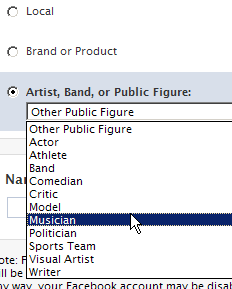
Despite clicking the Artist, Band, Or Public Figure selection, I was still being treated as an "Other Local Business". However, it wasn’t until I (reluctantly) fired up Internet Explorer when I realized that clicking on the radio button triggered a drop-down box that was supposed to be displayed.

FacebookStruggles02

This behavior was consistent with the "Brand or Product" selection as well.  Hopefully Facebook will fix this browser-compatibility issue, but in the meantime I hope this will will help someone looking to outreach on Facebook.

Hotmail by any other name…

I realize I’ve pretty much turned my blog into a sports rants blog over the last few weeks, so I’ll try to diversify topics a bit.

Today big news came from Microsoft that they released their “Live” services out of beta, releasing some great new tools, including the ability to get a @live.com email address.  There’s nothing like the opportunity to jump on board a new major email bandwagon, and have the ability to have your name – without any numbers of weird spellings – as your email address.

I grabbed the address I wanted and logged into the new Hotmail.  The interface is clean, definitely a step above Gmail and arguably within reach of the new Y! Mail interface.  I goof around a little bit, import my contact list with no problem and send myself the inaugural test message to myself.  Much to my dismay, I receive the following:

Live-comEmails

You’re kidding me.  An ad at the bottom of my messages?

I realize that there’s no such thing as a free lunch, but when you see the exciting things Gmail is doing with free IMAP access, not to mention that they’ve never had tagline ads at the bottom of their messages – there’s really no compelling reason to use Live mail in a serious capacity.  Granted, Yahoo does still use tagline ads in their messages as well – and it should be known that I pay the $20 per year for the Yahoo Mail plus which removes the tags (and offers other features).  However I’ve personally locked into using my Yahoo mail account through years of usage.  There’s no way I would start using a Live.com account with these annoying taglines here in 2007.  Even if I wanted to upgrade my Live account, there’s no indication on Hotmail that it’s even an option.  I looked all over the “settings” area and couldn’t find anything that referenced upgrading your account. In Yahoo Mail it’s right there in the “Options” tab.

I can appreciate that Microsoft wants to remove some of the perceived stigma that has been historically attached to the “Hotmail” branding, but if you’re going to put a new face/branding on a limited product, you’re still going to have to live with the limitations.  I don’t know how they can expect people to live with “Live” with crap like this going on.
